


Research a market thesis
Find relevant metrics and research, then ask your assistant to compare the evidence behind your idea.
Find Alphractal research on Bitcoin valuation and explain which metrics I can inspect to test the thesis.
MODEL CONTEXT PROTOCOL
Bring Alphractal’s market intelligence into your AI assistant. Research assets, analyze positioning and build workflows with connected metrics, charts and research.
THE PROBLEM
An assistant can explain a market idea without having the metrics needed to test it. That leaves you copying charts, searching for numbers and rebuilding the context by hand.
Alphractal MCP connects that conversation to the platform’s data and research. Ask your assistant to investigate a thesis, compare metrics or check market conditions using Alphractal sources, without moving every question back into the platform.
“Which metrics can I use to test this thesis?”
Consulting Alphractal
search_metricsget_metric_infoget_metric_data[1][2]
HOW IT WORKS
Sign in to Alphractal and open the MCP setup page. Choose the connection instructions for your AI client.
Use account sign-in in an OAuth-compatible client, or an API key in a client that supports custom headers. Review the tools you expose and the access supported by your plan.
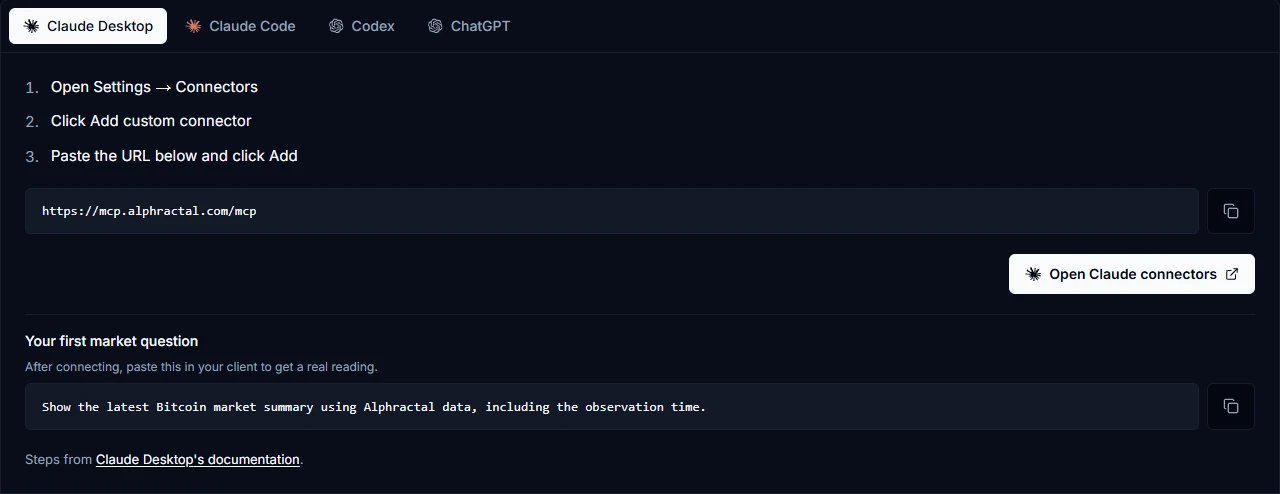
Ask a market question and let your assistant find relevant metrics, charts or research. Review the sources, dates and limitations before using the answer.
“Summarize Bitcoin’s recent liquidation activity and distinguish the observed data from a directional forecast.”
WHAT YOU GET
Find relevant metrics and research, then ask your assistant to compare the evidence behind your idea.
Find Alphractal research on Bitcoin valuation and explain which metrics I can inspect to test the thesis.
Bring positioning, liquidations and market context into the same conversation.
Summarize Bitcoin’s recent liquidation activity and distinguish the observed data from a directional forecast.
Use Alphractal tools inside your own reports and agent workflows, with the schedule and review process you define.
Prepare a daily review template covering funding, open interest and liquidation activity, with sources and missing-data notes.
TOOL CATALOG
Give your AI the tools to investigate assets, read market conditions and turn questions into deeper analysis.
Find an asset, understand its market profile and examine its price history.
search_assetsLocate a cryptocurrency by name or identifier.get_summary_infoRead the asset’s available market summary and supporting indicators.get_asset_price_historyRetrieve historical prices for the asset you are investigating.Find the data behind a thesis and understand what each metric measures.
search_metricsSearch the metric library by name or market concept.get_metric_infoRead its definition and interpretation notes.get_metric_dataRetrieve the available time series for a metric and asset.Find relevant charts and inspect the metrics behind each view.
suggest_chartsDiscover charts by name, description or metric.get_chart_detailsRead its description, category and supporting context.get_chart_metricsSee which metrics are used in the chart.Investigate derivatives positioning and the liquidation levels around an asset.
get_screener_overviewReview aggregate derivatives conditions and market rankings.get_screener_dataRetrieve available funding, open interest and liquidation data.get_liquidation_clustersInspect cluster price levels, size, side and distance from the current price.Compare evidence across assets and metrics, then investigate historical relationships.
compare_metricsExamine multiple metrics side by side.rank_assets_by_metricFind the highest and lowest values across supported assets and metrics.backtest_metricExplore threshold behavior and relationships with price over supported historical windows of up to 90 days.Find Alphractal research and connect its conclusions to your own investigation.
search_reportsFind reports by topic, thesis or keyword.get_reports_by_assetRetrieve reports related to a specific asset.get_report_key_insightsInspect the available conclusions and insights from a report.Review existing alerts and prepare new monitoring conditions for confirmation.
get_user_alertsInspect the alerts already configured in your account.prepare_alertValidate and stage a monitoring condition for review.confirm_alert_creationCreate the prepared alert after the user reviews and confirms its configuration.Bring your watchlist and saved screening views into your connected workflow.
get_user_favoritesRetrieve your saved assets and charts.list_screener_viewsFind the screener views saved in your account.create_screener_viewSave a named selection of screener columns for future use.FAQ
MCP is a standard that lets an AI client connect to external tools and data. Alphractal uses it to make supported platform data and actions available inside compatible assistants and agents.
Connect your assistant and start exploring the data behind your market questions.